

VTOL UAV Simulator Supplier: How to Choose the Best Fit for Your Training Needs
2026-08-24
Choosing a VTOL UAV simulator supplier isn't a checkbox exercise—it's the difference between pilots who react and pilots who anticipate. Too many training programs settle for generic fixed-wing simulators, then wonder why real-world vertical-to-horizontal transitions go wrong. That's where SRIZFLY comes in: a supplier focused on the physics, control logic, and failure modes that actually define VTOL flight. In this post, we'll break down the practical factors—from hardware fidelity to software updates—that separate a true training partner from a costly demo. If your mission profile demands more than a video game with wings, keep reading.
Beyond the glossy demo: How closely does the simulator replicate your VTOL aircraft's actual transition dynamics?
Demo reels tend to flatten the transition corridor into a smooth, continuous curve. In the actual aircraft, the handoff from vertical lift to wing-borne flight is rarely that clean. A simulator's ability to reproduce this phase depends on whether its aerodynamic model captures the sudden loss of propwash over the wing, the shift in downwash on the tail, and the nonlinear pitch moment that comes with it. Most off-the-shelf tools use static stability derivatives, which miss the time-dependent flow interactions that show up as a transient pitch-up or a brief roll asymmetry during the mid-transition.
What separates a faithful replication from a marketing animation is how the simulator handles control coupling. On a real tiltrotor or lift+cruise design, tilting the nacelles or ramping the pusher prop changes both thrust vector and local airflow over the horizontal stabilizer. If the model does not include propeller-wing interaction terms, the simulated aircraft will hold heading too easily, understate the pilot's workload, and may even allow transitions at airspeeds that would cause a departure in flight test.
The short answer is that no simulator fully replicates the messy, unsteady aerodynamics of a VTOL transition without a substantial amount of flight-test data baked into the model. Even high-fidelity CFD-informed models tend to struggle with separated flow on the wing root or duct lip during the hover-to-forward-flight push. So while a polished demo can show the intended behavior, the real question is whether the simulator has been validated at the edges of the transition envelope, where the aircraft actually misbehaves.
Failure modes that match your operational risk register, not a canned list of generic emergencies
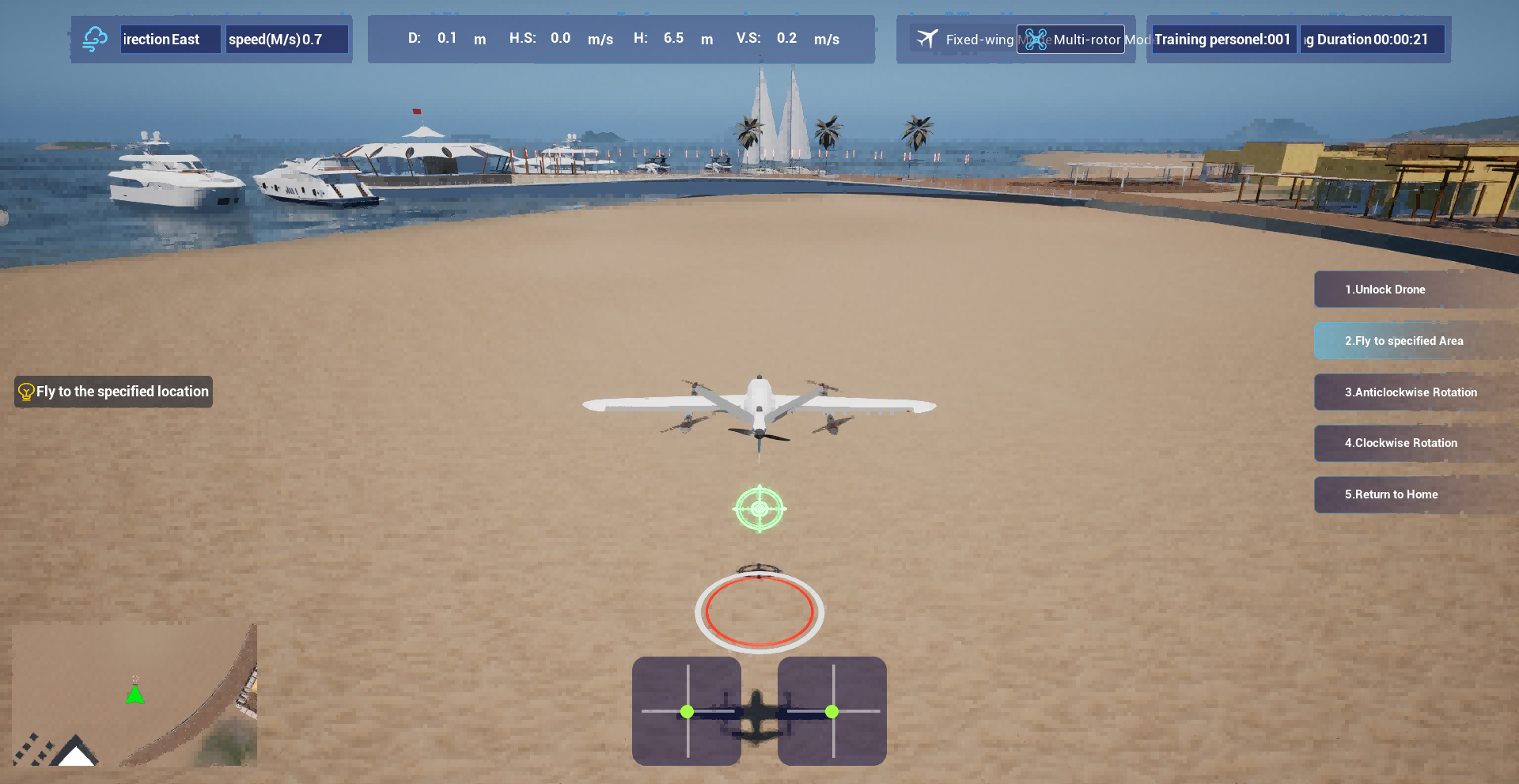
Most emergency response plans fail because they were written against a generic checklist—fire, flood, power outage—rather than the actual ways your operation could break. A useful plan starts with the risk register you already maintain for audits and insurance. Pull the top ten scenarios from that register: the specific pump that seizes every winter, the supplier whose single-sourcing has nearly shut you down twice a year, the legacy software that fails silently after every update. Those are your emergencies. Not a list you copied from a trade association template.
When you map failure modes directly from your risk register, you also uncover dependencies that generic lists ignore. For instance, your register may show that a loss of cooling water triggers a cascade through three different production lines—but only if the ambient temperature exceeds 28°C. That nuance never appears in a canned plan. Writing response procedures for that exact condition, with the actual valve isolation points and the actual team members who know the bypass route, turns the plan from a binder on a shelf into a working document.
Finally, matching your plan to the risk register means maintenance and revision become nearly automatic. Every time you update the register—new equipment, a changed supplier, a near-miss investigation—the corresponding emergency response page gets flagged for review. You stop pretending that a chemical spill and a ransomware attack can be handled by the same generic call tree. Instead, each failure mode carries its own triggers, its own first-hour actions, and its own list of people who understand the downside because they live with the risk every shift.
Custom terrain and mission scripting: Can the simulator ingest your real-world maps and weather data?
A simulator might claim geospatial import, but the real test is whether it accepts common survey or GIS formats without forcing you through a proprietary converter. Look for direct support for GeoTIFF heightmaps, vector overlays from shapefiles, and OpenStreetMap building footprints. If the tool expects you to hand-align a flat image, that is a sign the pipeline is more about visuals than actual terrain behavior.
Mission scripting is where that terrain data becomes functional. You want a scripting environment that can reference real-world coordinates, place objects from imported map layers, and trigger events based on position or time. A capable API lets you attach navigation aids, obstacles, or landing zones to features that already exist in your dataset rather than rebuilding them by hand.
Weather ingestion is just as important. Check whether the simulator can pull live or historical METAR reports, GRIB forecast grids, or even custom atmospheric profiles. The difference shows up when a storm cell from your local radar feed changes visibility, wind shear, and ground lighting in sync with the imported terrain, creating a training scenario that feels tied to the actual world.
Hardware handshake and control latency: Will the simulator talk to your existing ground control station without added lag?
Many simulators claim to support common ground control protocols, but a real hardware handshake involves more than just exchanging a few heartbeat packets. If the simulator doesn't replicate the exact ack/nack timing and parameter sync messages that your GCS expects, the link will stall or trigger constant re-requests. That's where hidden latency creeps in — not from the physics engine, but from protocol mismatches that force both ends into fallback modes.
Control latency gets worse when the simulator inserts its own message queue between the GCS and the virtual aircraft. A clean implementation should act as a transparent bridge, passing MAVLink or equivalent frames through with minimal processing. Any extra parsing, re-framing, or buffering adds milliseconds that feel innocuous in a demo but become obvious during aggressive manual flight or automated missions where every loop iteration counts.
The practical test is to connect your existing ground station to the simulator and compare round-trip command-to-telemetry timings against a real autopilot on the bench. If you see more than a 10–15 ms difference on a typical USB or serial link, the simulator is doing too much in software. A well-designed hardware-in-the-loop setup will match those timings so closely that switching between simulated and real flights won't require recalibrating your control instincts.
Update cadence as a trust signal: How often does the supplier refine flight models and sensor behavior?
Watching how frequently a supplier ships refinements to their flight models and sensor logic tells you far more than any glossy brochure. A steady rhythm of small, targeted updates—say, every few weeks—usually means the team is actively flying, collecting data, and correcting drift. Long silent stretches, followed by a sudden large patch, can signal that problems are being patched reactively rather than engineered proactively.
Some suppliers push tweaks to aerodynamic coefficients or noise filtering almost every month. Others batch changes into quarterly releases. Neither pattern is inherently wrong, but the key is whether the cadence matches the operational reality of the aircraft. If a vendor flies daily and still only updates once a year, something is off. Look for release notes that name specific behaviors: crosswind handling, barometer lag, vibration rejection. Vague entries like "sensor improvements" without measurable context are a red flag.
The most trustworthy suppliers treat update frequency as a conversation with operators. They publish short notes explaining what changed in the flight stack and why it matters for your mission. A cadence of two to six weeks for sensor-related refinements is common among teams that treat simulation-to-real transfer as an ongoing process, not a one-time event. If you cannot find a clear history of updates before purchase, assume the model you are buying is frozen in time.
The lifecycle cost question: Where do licensing fees, per-seat pricing, and hardware refreshes add up?
Most teams only look at the upfront price tag on a software or hardware purchase, but the real drain happens over months and years. Licensing fees rarely stay flat—vendors add modules, raise renewal rates, or shift you to a subscription model that quietly doubles the original cost. Per-seat pricing is even sneakier: what starts as a modest fee for ten users becomes a serious budget line once contractors, part-timers, and occasional collaborators all need access. Before you know it, you are paying for seats that sit empty half the time.
Hardware refreshes are the silent partner in this equation. A new batch of laptops or servers might feel like a one-time capital expense, but maintenance contracts, extended warranties, and the inevitable mid-cycle upgrades turn it into a recurring obligation. Combine that with software licenses tied to specific machine counts, and every refresh forces a renegotiation that rarely works in your favor. The lifecycle cost question is not about whether these expenses exist—it is about whether anyone is tracking them together.
Smart organizations map out the total cost over a realistic window, usually five to seven years, instead of comparing sticker prices. They ask how many seats will actually be used, whether the vendor has a history of price hikes, and what the true replacement cycle looks like for the hardware. Those that skip this exercise end up with a patchwork of surprise invoices—each one small enough to approve, but together large enough to wreck the annual budget.
FAQ
Hover stability in ground effect, transition buffeting between vertical and forward flight, and control response changes at low airspeed are the ones that separate useful training tools from animated toys. If a supplier glosses over those moments, their model will teach habits that fail in the field.
Ask for a demo where the aircraft has to reject a landing and transition back to hover at 200 feet with a crosswind. Watch whether the flight model stutters or the simulator instructor has to pause the session. Smooth, physics-driven handoffs show the supplier modeled the aerodynamic coupling, not just a switch between fixed-wing and multirotor code.
Look for support of common stick-and-rudder setups, VR headset tracking without drift, and the ability to plug in actual ground control station software. A supplier that only offers mouse-and-keyboard control or locks you into one proprietary joystick hasn't adapted to how operators actually train.
You should be able to edit weather, payload mass, failure modes, and geographic terrain without sending a request to the vendor. If every new training scenario requires a quote and a software update cycle, the supplier's tool is a demo reel, not a training platform.
Test their rendering at the altitudes and speeds you actually operate—low-altitude obstacle detection at dusk, dust clouds during landing, or sensor gimbal views. If the visuals break down under those conditions or the frame rate tanks when you add wind and rain, it won't survive a month of daily training.
A dependable supplier maintains a changelog tied to real aircraft firmware updates, offers direct access to engineers during training integration, and releases new failure scenarios without charging a subscription for every patch. If their last update predates your current airframe version, you'll be training on stale tactics.
Defense experience often means deeper failure modeling and classified-friendly environments, but commercial-focused suppliers tend to iterate faster on affordable VR and cloud-based debriefing tools. Match the supplier's background to your most common mission profiles—if you train powerline inspection crews, a defense-only vendor may overcomplicate the interface.
Cheap simulators usually hide costs in per-seat licenses, scenario creation fees, or hardware lock-ins. A higher upfront price with unlimited instructor stations and editable scenarios often becomes cheaper after the first year, especially if you retrain pilots frequently. Ask for a three-year cost projection, not the demo price.
Conclusion
Selecting a VTOL UAV simulator supplier starts with verifying that the software reproduces your aircraft's transition dynamics, not just the polished hover-to-cruise sequences shown in sales demos. Ask for a side-by-side validation against flight test data, especially the moments when tiltrotors or lift fans shift between vertical and forward flight—those are the regimes where most generic simulators fall apart. Equally important is whether the failure modes match your own operational risk register. A canned list of engine-outs or GPS drops won't prepare pilots for the rare hybrid configuration faults or sensor disagreements that keep your safety team up at night. Beyond the flight model, check whether the simulator can ingest real-world terrain, obstacle databases, and local weather feeds. If it forces you to train over a fictional landscape or with static wind, crews won't build the spatial and environmental judgment they need for actual missions. And don't overlook the hardware handshake: the simulator must talk to your existing ground control station with imperceptible latency, otherwise stick inputs and telemetry feedback develop a rubber-band feel that degrades fine manual control during transition.
Another trust signal is the supplier's update cadence. A vendor that ships quarterly flight-model refinements or tunes sensor noise to match real equipment demonstrates an active engineering relationship with your airframe, while one that offers only cosmetic scenery packs after the initial sale is unlikely to keep pace with your aircraft's evolving software. Then look at lifecycle cost plainly: per-seat licensing, dedicated hardware dongles, annual maintenance, and forced hardware refreshes can quietly double the quoted price over five years. Ask for a total cost of ownership breakdown that includes concurrent user limits, scenario library expansions, and integration with live weather or traffic feeds. The right supplier isn't the one with the flashiest demo reel, but the one that treats the simulator as an engineering-grade training instrument—responsive, data-faithful, and financially transparent. When you evaluate against those dimensions rather than a feature checklist, the choice becomes clearer.
Contact Us
Contact Person: Niles Liu
Email: [email protected]
Tel/WhatsApp: 8619945009803
Website: https://srizfly.com/